RFID Inventory Reconciliation: From Field Reads to Explained Discrepancies

RFID Inventory Reconciliation: From Field Reads to Explained Discrepancies

RFID inventory reconciliation starts where reading stops: an inventory that only reads tags produces a count, not a reconciliation. The work consists of comparing that count with the register, explaining each difference and deciding what to do about it. How does the process unfold, which situations need to be told apart, and what does the SAM software actually do at each step?

RFID inventory reconciliation also answers a legal obligation. Under article L123-12 of the French Commercial Code, every trader must check by inventory, at least once every twelve months, the existence and value of the assets and liabilities of the business. How many computers, screens or tools are really where the register places them? With RFID, collection takes a few passes of the reader; what remains is making use of the difference between the register and the field.

Inventory reconciliation is only one step in the RFID chain. For the overall picture, from asset tagging to tracking over time, see our page on RFID inventory management and traceability.

Why reading RFID tags is not enough to make an inventory

An RFID inventory involves three distinct steps: reading the tags, reconciling with the register, then updating the register. Reading only produces a list of detected identifiers. Comparing it with the expected equipment brings out the discrepancies, and a manager's decision corrects the data. Confusing these steps distorts the result.

A UHF RFID read (radio-frequency identification in the ultra-high-frequency band) works without a direct line of sight, on several tags at once. In a manual count, each item is spotted by eye and ticked off on a list. RFID removes most of that spotting time, but it increases the volume of data to interpret.

  • →Reading: the terminal collects the identifiers of the tags detected in the area.
  • →Reconciliation: the software compares that list with the equipment expected in the scope.
  • →Update: after checking, corrections to location, assignment or status are validated.

Two mistakes come up often: treating a read as a finished inventory, or changing the register on the strength of a single pass.

How an RFID inventory reconciliation unfolds

An RFID inventory reconciliation takes place in four stages: define the scope, read the tags, compare the identifiers read with the expected equipment, then adjust the register. The quality of the result depends as much on the starting register and the chosen scope as on the reading itself.

Define the scope and prepare the reference data

Before reading, you need to know what to expect: a stock, a site, a department or the equipment entrusted to one person. The register must list the equipment concerned with its location, assignment and status. In SAM, each equipment record carries an asset number, a category, a reference (the model), a destination (stock, employee or site), a condition and a history, as detailed on the page about asset and equipment tracking. An incomplete reference base produces discrepancies that are not real ones.

Read the tags in the field

The reader interrogates the tags within its read zone. Zebra quotes a nominal range of around 6 metres for its RFD40 sled: tags located in a neighbouring room can therefore come up alongside those in the room being checked. Working room by room and checking that each pass covers the intended space limits that risk.

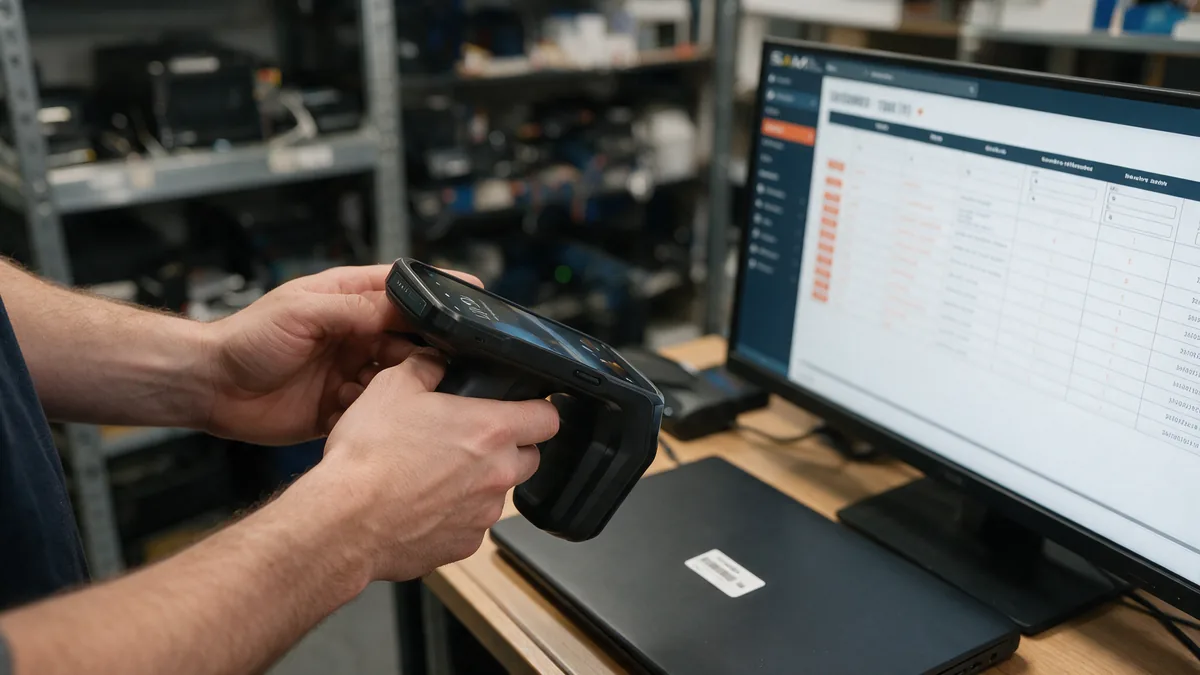
Zebra TC22R RFID terminal pointed at a UHF-tagged laptop, with the SAM register displayed on screen

Compare what is expected with what is detected

The software matches the list of identifiers read against the register and classifies each item: found, missing, surplus or unknown. This classification is a reading observation, not a conclusion.

Adjust the register

Each discrepancy calls for a decision: look for the item, correct its location, regularise an assignment or declare it lost. Keeping the observation separate from the correction is the principle of good inventory discrepancy management: the register is never rewritten from a single read.

Found, missing, unknown: the situations to tell apart

A reconciliation places each item in a situation: found (expected and detected), missing (expected but not detected), surplus or moved (detected outside its theoretical location) and unknown (code read but absent from the register). Each situation is checked before any correction of the register.

What matters is not the number of discrepancies but their nature: each one calls for a different decision.

SituationWhat the count showsWhat to checkTypical decision
UnknownA code is read, no record in the register matches itItem tagged but never registered, tag applied by mistakeCreate the record from the app, number scanned from the tag
MissingItem expected, no tag detectedArea actually covered, loan or repair in progress, damaged tagSecond read, then leave unchanged, move, or archive as lost
Surplus or movedTag detected outside the location in the registerUnrecorded transfer, read from a neighbouring areaCorrect the location or the assignment
FoundItem expected, tag detected in the areaTag attached to the right item (sample check)None: the register is confirmed

The conditions for qualifying a discrepancy correctly

An undetected item is not a lost item. Before qualifying a discrepancy, check at least:

  • →that the area read matches the defined scope, with no room forgotten and no locked access;
  • →that a second pass, from another angle, does not detect the tag;
  • →that the item is not on loan, under maintenance or in transit according to its history;
  • →that the tag is not damaged or applied to a surface that disrupts reading, such as metal;
  • →that the register is up to date on the expected location and assignment.

This is where the history kept by asset management software earns its keep: a "missing" item is cross-checked against a current loan before being declared lost.

What the SAM app shows in the field

SAM (SBE Asset Manager) is SaaS asset management software with a synchronised mobile app. In the field, every scan is immediately checked against the register: the app classifies the code read as "found" or "not recognised", then lets you act on the item without going back to a desktop.

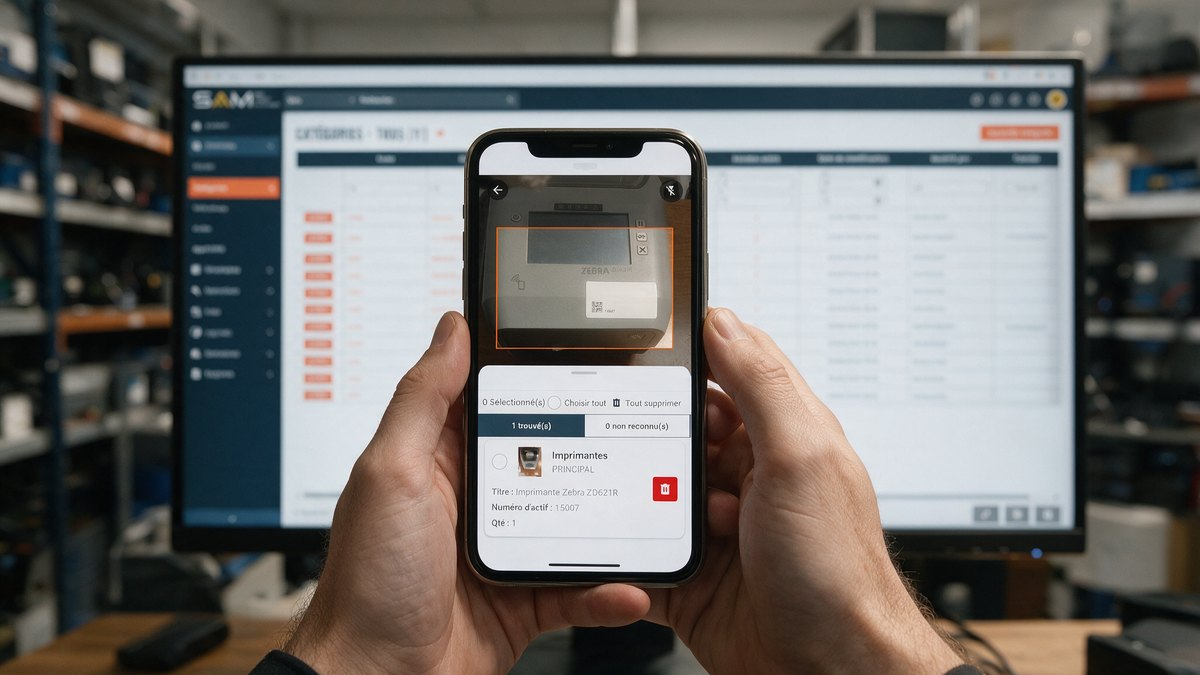
Scan in the SAM mobile app: the tag of a Zebra printer is recognised and its record appears with the asset number

One scan, two answers: "found" or "not recognised"

The app's central scan button opens the reader. Each code read appears in one of two tabs: "found" when it matches an item in the register, with its category, stock, title and asset number; "not recognised" when no item matches it. Scans build up in a list, so several tags can be read in a row before the results are processed.

Unknown tag: create the record without leaving the field

During our tests of 19 October 2026 on the SAM mobile app, two QR code tags that had never been registered (nos. 00010004 and 15007) appeared under "not recognised". From the "Create" button on the home screen, each item's record was created on the spot: category, reference, destination, then the asset number filled in by scanning the tag itself, which rules out any typing error. On the next scan, the app showed "1 found". The "unknown" situation is thus settled the moment it is observed.

Find, move and correct from the mobile inventory

The app's Inventory tab lists items with their stock and number, and offers search and filters. A selected item can be edited, moved to another stock, employee or site, or have its quantity adjusted. Its record gathers photos, a Maintenance tab and a History tab: that history is what makes it possible to cross-check a discrepancy against a loan or a service job.

Inventory counts in SAM: from counting to adjustment

A SAM inventory count organises the reconciliation from end to end: you define a scope, count, then process each discrepancy line by line before closing. No correction of the register happens without validation, and every adjustment stays traced in the reports.

According to the software documentation, a count is created on a precise scope (a stock, a user or a location), which can be refined by category. The items concerned can be locked during the count: they can no longer be moved or lent, which freezes the reference base. A "blind" mode hides the expected quantities from the people counting, to limit bias.

Once counting is over, the count moves into the adjustment phase. Each discrepancy is accepted or ignored. For a missing item, three options exist: leave it unchanged, move it to its actual location, or archive it as lost. The inventory reports (count summary, discrepancy detail, adjustment audit, accuracy by category or by location) rely on the SAM reporting module. Note: the availability of inventory counts depends on the licence chosen; the exact scope is confirmed during a demonstration.

From terminal to software: RFID reader, settings and tag encoding

Getting from the field to the software relies on three elements: an Android terminal running the SAM app, a UHF RFID reader (built into the terminal or in sled form) and tags encoded according to the software's rules. The terminal settings and the tag encoding determine how reliable the reads are.

Integrated terminal, or terminal plus sled

Two configurations coexist. The Zebra TC22 reads barcodes, QR codes and NFC, and pairs with the RFD40 sled for UHF RFID. The Zebra TC22R builds the UHF module directly into the terminal. The differences are detailed in our TC22 vs TC22R comparison.

The setting to plan on the terminal

Without any setting, a Zebra terminal reads codes with its camera. To use its built-in scanner and RFID, the SAM documentation provides for a dedicated profile in DataWedge, the configuration utility for Zebra terminals, then selecting the "Zebra" scan mode in the app settings. This set-up is done once, before the first campaign.

Tag encoding and standards

A UHF RFID chip has several memory banks. The SAM documentation specifies that the asset number must be encoded in the chip's User Memory bank, not in the EPC bank: a point to confirm before ordering or encoding a batch of tags. SBE's 65 x 35 mm UHF RFID tag is based on the Impinj M730 chip, using the EPC Gen2 V2 protocol. According to GS1, ISO/IEC 18000-63 is the new name of ISO/IEC 18000-6 type C, updated with optional security commands after the publication of Gen2v2 in 2015.

Read speed, a manufacturer figure to put in context

Zebra quotes a maximum read rate of over 1,300 tags per second for the RFD40 (Zebra RFD40 data sheet). This is a theoretical performance, expressed in reads: it does not mean that 1,300 items are inventoried every second. The result varies with the type of tag, their density, the presence of metal or liquids, orientation and distance.

The practical benefits for a fleet manager

Combining RFID and SAM cuts collection time, makes discrepancies visible from the field pass onwards and keeps the history of corrections. These benefits assume an up-to-date register, careful tagging and a correctly configured terminal.

  • →Faster collection: reading without a direct line of sight avoids spotting each item one by one.
  • →Discrepancies visible on site: the app classifies each code read as "found" or "not recognised" at the moment of scanning.
  • →Unknown tags regularised immediately: the record is created from the terminal, number scanned.
  • →More reliable data: discrepancies are accepted or ignored one by one, and adjustments stay traced.
  • →Centralised tracking: for fixed asset management, loans, maintenance and history are consulted in the same tool as the register, the SAM asset management software.

The limits to know before deploying

RFID is not infallible. A tag peels off, is hidden behind metal or liquid, or escapes reading depending on its orientation. An untagged item remains invisible to the reader: prior tagging is the condition for everything else, with fixed asset inventory and identification labels suited to the surface. On-metal versions exist for metal surfaces. Planning a second pass for any significant discrepancy and checking the tag encoding before the first campaign removes most of the risk. To place RFID alongside barcodes and NFC, the guide understanding RFID in 10 points compares the technologies.

Before you start: two points to confirm on your equipment

Two settings determine a reliable reconciliation with RFID. They are confirmed with the hardware and tags selected for your project, before the first counting campaign.

  • →The terminal's read mode: a Zebra terminal reads with its camera by default. Reading with the built-in scanner or with RFID requires the set-up described above (DataWedge profile, Zebra scan mode in the app); have it confirmed at commissioning.
  • →Tag encoding: the SAM documentation requires the asset number to be encoded in the chip's User Memory bank. Check that your tags and their encoding process follow this rule before tagging the whole fleet.

SBE agents provide set-up and training on request.

A reliable inventory does not come down to read speed. It rests on an up-to-date register, a controlled scope, careful qualification of discrepancies and a correction validated by a manager. RFID speeds up collection, the SAM app classifies each scan and regularises unknown tags on the spot, and inventory counts organise the adjustment of the register. To see this sequence on your own equipment, book a SAM demonstration: it is the most direct way to assess an RFID inventory reconciliation.

Frequently asked questions

What is an inventory reconciliation?

It is the comparison between the equipment recorded in the register and the equipment actually observed in the field. It brings out four situations: found, missing, surplus or moved, unknown. Each discrepancy is then checked, and the register is corrected or confirmed. With RFID, collection is faster, but analysing the discrepancies remains a step in its own right, carried out by a manager.

What does a "not recognised" code mean in SAM?

A "not recognised" code is a code read by the SAM app that matches no item in the register. Most often, the tag was applied but the item's record was never created. From the app's "Create" button, the record is created on the spot by scanning the tag to fill in the asset number. On the next scan, the item appears in the "found" tab.

Is an undetected item necessarily lost?

No. It may be outside the read zone, in a locked room, on loan, under repair, or carry a damaged or hidden tag. A second read and a look at the item's history come before any declaration of loss. In a SAM count, a missing item can be left unchanged, moved to its actual location or archived as lost, after validation.

Can you take an inventory with SAM without RFID?

Yes. The SAM mobile app scans barcodes and QR codes with a smartphone or tablet camera, or with the built-in scanner of a Zebra terminal once configured. Our tests of 19 October 2026 were carried out with QR codes. RFID speeds up collection on large volumes; the availability of inventory functions depends on the licence chosen.

How do you encode an RFID tag for use with SAM?

The SAM documentation states that the asset number must be encoded in the User Memory bank of the UHF RFID chip, not in the EPC bank. This point is checked before ordering or encoding a batch of tags, because encoding in the wrong bank prevents reconciliation with the item's record. The SBE team supports you with this set-up.

Why is reading RFID tags not enough to make an inventory?

Because a read does not say whether the item is in its place, whether it is missing or whether it was never registered. Reconciliation compares the count with the register and qualifies each discrepancy: that step is what makes the inventory usable. The register is corrected afterwards, once a manager has checked.

How is the field count reconciled with the asset database?

In the SAM app, each scanned code is immediately classified as "found" or "not recognised" depending on whether it matches a record in the register. In an inventory count, the count of a scope is then compared with the expected equipment, and each discrepancy is accepted or ignored during the adjustment phase. Depending on its nature, the discrepancy leads to creating a record, recounting an area, correcting a location or archiving a lost item.

We use cookies to improve your experience.