Label printers

Label printers

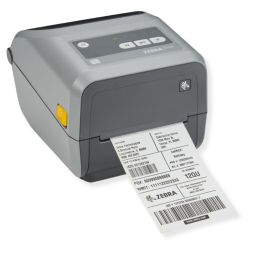
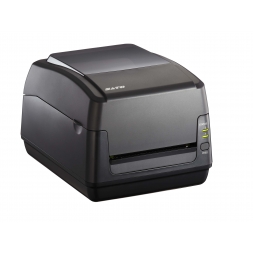
A label printer allows you to produce your barcodes, serial numbers, and product labels in-house, whenever you need them. Depending on your application, it supports direct thermal or thermal transfer printing, with resolutions of 203, 300, or 600 dpi, on paper, synthetic, or textile media. This category includes desktop, industrial, and RFID label printers from Zebra, SATO, and CAB, along with compatible consumables and label design software. The right printer depends on your printing volume, the required label durability, and your label size and format requirements.

Read more ↓
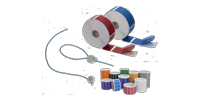
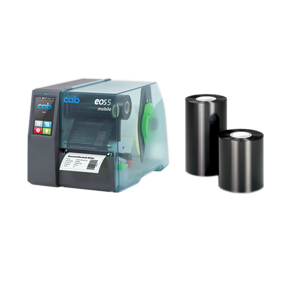
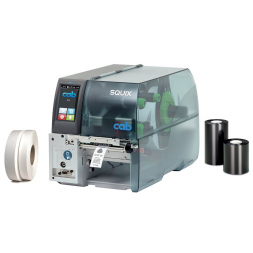
Thermal transfer printer and black and colour ink ribbons

Why invest in a professional label printer?

For any business, investing in a professional label printer is a strategic decision. It allows you to produce your own labels in-house, giving you complete control over your identification and labeling processes.

You no longer have to rely on external suppliers or wait for delivery times when urgent labeling is required. In addition, printing labels on demand significantly reduces the risk of logistical errors.

By printing labels whenever they are needed, you ensure that every product, pallet, or document receives the correct identifier at the right time. A professional label printer is an essential tool for improving inventory accuracy, streamlining operations, and optimizing your supply chain.

Printing technologies: thermal transfer or direct thermal

A thermal label printer can use two different printing technologies.

  • Direct thermal printing uses heat-sensitive labels that darken when exposed to the printhead. This is a cost-effective solution that requires no ink or ribbon, but the printed labels are more sensitive to UV light, heat, and abrasion.
  • Thermal transfer printing, on the other hand, uses a heated ribbon to transfer ink onto the label material. This method provides outstanding durability, producing labels that resist scratches, chemicals, moisture, and temperature fluctuations.

Understanding how a thermal label printer works is one of the best ways to choose the right printing technology for your business and make the right investment.

Direct thermal or thermal transfer: which technology should you choose?

The choice between these two printing technologies depends entirely on the expected lifespan of your labels. The table below provides a quick comparison to help you select the most suitable solution:

TechnologyLabel LifespanRecommended Applications
Direct ThermalShort-term (less than 6 months)Shipping labels, receipts, short-term logistics
Thermal TransferLong-term (several years)Asset identification, warehouse shelving, industrial environments

How do you choose a label printer?

To choose the right label printer, you first need to assess your operational requirements carefully.

Review your actual labeling needs and ask yourself these four key questions before purchasing a label printer. It's the best way to avoid investing in a printer that is either oversized or insufficient for your application.

1- What is my print volume?

Your daily print volume is the most important factor when choosing a label printer. For occasional or moderate printing requirements ranging from a few dozen to a few hundred labels per day a compact desktop label printer will generally be the ideal solution.

If your production or logistics operation requires printing several thousand labels per day, you should consider an industrial label printer. These printers are built with heavy-duty components designed to withstand continuous, high-volume printing without overheating.

2- 203, 300, or 600 dpi? Choosing the right resolution:

The print resolution determines the level of detail your barcode label printer can produce.

  • The standard 203 dpi resolution is ideal for printing standard text and conventional barcodes. It is the fastest and most cost-effective option for most labeling applications.
  • A 300 dpi resolution is highly recommended for small text, detailed logos, and high-density 2D barcodes such as Data Matrix codes, where greater precision is required.
  • A 600 dpi resolution delivers exceptional print quality and is essential for applications involving miniature electronic components, pharmaceutical labeling, or any application requiring extremely fine detail.

3- Quelles sont les options de connectivité ?

To ensure seamless integration into your existing workflows, choosing the right connectivity options is essential.

  • Traditional wired connections, such as USB and Ethernet, provide reliable communication and stable network performance.
  • For greater flexibility, Wi-Fi and Bluetooth connectivity allow you to print labels directly from mobile computers, handheld terminals, or tablets.

4- De quelle largeur d'impression et formats d'étiquettes ai-je besoin ?

Make sure the printhead width matches your actual labeling requirements. Most standard label printers support a maximum print width of 4 inches (approximately 104 mm), which is suitable for the majority of applications.

If you need to produce large-format shipping or logistics labels, consider a printer equipped with a 6-inch or 8-inch printhead.

Our ranges of label printers

SBE Direct has selected for you the most reliable models from the leading manufacturers on the market.

We cover all needs, from small retailers to large-scale logistics platforms.

Desktop label printers (compact)

Ideal for small spaces, back offices, or retail points of sale, these printers combine a compact footprint with excellent ease of use.

They are perfectly suited for on-the-fly inventory labeling, such as with the SATO CG2 label printer, whose discreet design fits easily into the most space-constrained work environments.

If you are looking for an extremely versatile model with an innovative cartridge system, you can rely on Zebra thermal printers. Models such as the Zebra ZD421 eliminate complex handling thanks to a ribbon cartridge system that makes consumable replacement fast and effortless.

In the same spirit of usability and fluid operation, the SATO CT4-LX features a visual interface designed for immediate ease of use directly at the workstation.

Industrial label printers

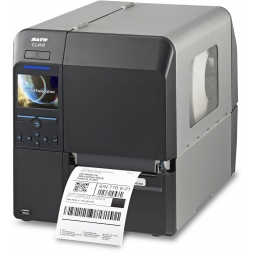
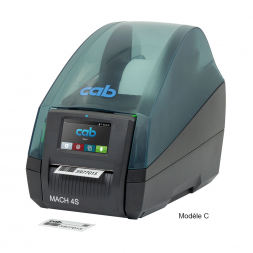
Designed for demanding environments, these printers feature a robust metal chassis for optimal protection. They deliver high printing speeds and are capable of handling large volumes without interruption. The CAB MACH 4S is a benchmark model in this category.

RFID label printers

To automate your traceability processes, RFID label printers go beyond simple ink-based marking: they turn your labels into smart tags by encoding data directly into the embedded radio-frequency chip.

This is the ideal solution for real-time, automated traceability. To support these systems, explore our full range of compatible RFID labels.

Essential consumables for your printer

Choosing the right consumable is just as important as choosing the machine to ensure high-quality marking.

Thermal transfer ribbons

The durability of your labeling depends on selecting the right ribbon ink formulation according to your environmental constraints. To properly choose your thermal transfer ribbons, three levels of resistance should be distinguished:

  • Wax: the most economical formulation, ideal for shipping on standard paper labels.
  • Wax-resin: a highly versatile compromise that provides improved resistance and prevents smudging caused by regular friction.
  • Pure resin: the most durable solution, designed for harsh environments and engineered to bond perfectly with synthetic label materials.

Label rolls

The strength of this equipment lies in its ability to handle a wide variety of materials. By simply changing the roll, you can switch from printing on standard vellum paper to printing on ultra-durable polyester labels.

You can even configure your setup as a clothing label printer using polyamide ribbons. Whatever the constraints of your industry, the success of the process depends on selecting the right thermal transfer labels.

Compatible labeling software

To design your roll-based self-adhesive label printers, the use of dedicated software is required. These tools allow you to generate globally compliant barcodes and import external databases (Excel, ERP systems).

We provide a selection of professional label printing software. These solutions are compatible with most major brands such as Zebra, Sato, or CAB, and ensure quick adoption by your teams.

SBE Direct, your label printing expert

Drawing on our expertise in professional identification, we support businesses in securing and tracking their assets. Our technical advisors are available to review your specifications and guide you toward the most suitable thermal self-adhesive label printer solution for your business needs.

FAQ

What printer should you use to print labels?

A thermal printer (direct thermal or thermal transfer) is the standard solution for professionals. Unlike traditional inkjet models, it is specifically designed to print roll-based formats quickly, cost-effectively, and with high durability.

What types of labels can you print?

You can print on a wide variety of materials depending on your needs: standard vellum paper, tear-resistant polyester, water-resistant polypropylene, or even textile materials for clothing applications.

What is the difference between a label maker and a label printer?

A label maker is generally a small, standalone portable device with a built-in keyboard, used for basic on-the-spot labeling. A professional label printer, on the other hand, is more powerful, connected to a computer or network, and designed to print large volumes using dedicated software.

What resolution should you choose for barcode printing?

A resolution of 203 dpi is sufficient for standard 1D barcodes and readable text. If you need to print very small 2D barcodes (such as QR codes or Datamatrix) on small labels, you should opt for 300 or 600 dpi.

How much does a professional label printer cost?

Prices vary depending on the range. A compact desktop printer typically costs between €250 and €800 on average. For industrial printers capable of continuous high-volume printing, the budget generally ranges from €1,000 to €3,000.

Can you print color labels with a thermal printer?

Thermal printing is mainly monochrome (usually black). To get color output, you either need to use a specific colored ribbon (with manual change), use a color inkjet label printer, or choose pre-printed colored labels and overprint variable data in black.

Filtrer

We use cookies to improve your experience.